

View Categories

Updating Credit Cards via SmartHub

Payments Card Industry (PCI) Data Security Standards are a global set of requirements. Safety measures require card owners, to manage their own data to protect their credit card details.

Using the SmartHub tool you can easily and safely do just that.

Log into SmartHub: https://nexicom.smarthub.coop/

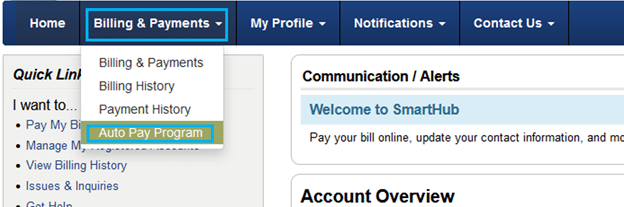
  1. Click on Billing and Payments which should appear at the top and the bottom of the webpage
  2. From the Billing and Payments drop down, click Auto Pay Program
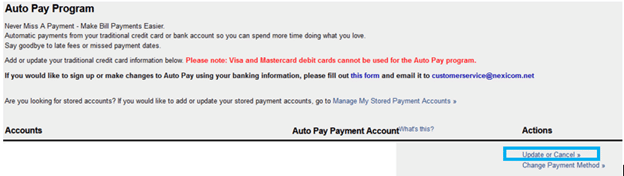
  1. On the Auto Pay Program page, click Update or Cancel, to enter your new credit card information
  1. Hit Accept on the Auto Pay Terms & Conditions screen

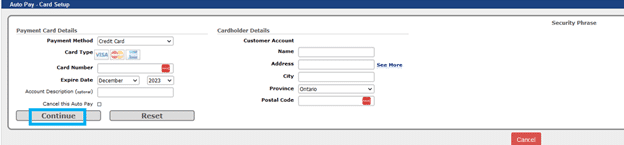
  1. You will be directed to the Auto Pay – Card Setup screen
  2. Update your credit card information and click Continue
Please note: Customer Service will close at 4PM on Dec. 24 & 31, closed all day Dec. 25, 28 & Jan. 1.
Technical Support will close at 4PM on Dec. 24 & 31, closed all day Dec. 25, 26 & Jan. 1 and will be available 8AM - 5PM on Dec. 28.

Please note: Customer service is closed August 3th for the Civic Holiday. Our Technical Support is still available by phone from 9AM - 5PM.

Please note: Customer service is closed September 7th for Labour Day. Our Technical Support is still available by phone from 9AM - 5PM.

Please note: Customer service is closed October 12th for Thanksgiving. Our Technical Support is still available by phone from 9AM - 5PM.

Please note: Customer service is closed February 16th for Family Day. Our Technical Support is still available by phone from 9AM - 5PM.

Please note: Customer service is closed April 3rd for Easter. Our Technical Support is still available by phone from 9AM - 5PM.

Please note: Customer service is closed May 18th for Victoria Day. Our Technical Support is still available by phone from 9AM - 5PM.

Please note: Customer Service and Technical Support will be available from 8AM - 4PM on December 4th for a company event.

Nexicom will be closed on July 1st for Canada Day.